
Customer Payments & Invoices Dashboard in Power BI

Automatically match customer payments to invoices, track outstanding balances, and build a complete Accounts Receivable dashboard in Power BI.
Customer Payments & Invoices Dashboard in Power BI
Get started with your Dashboard

Still trying to figure out who's actually paid you?

it doesn’t have to be that painful!

You raise a clean invoice and wait to get paid. Instead, the client deposits a lump sum into your account, tells you to adjust it against some invoices, and says “we’ll settle the rest later.”

You make a mental note. (You will probably forget it.)

Now stretch that across dozens of clients × hundreds of invoices, month after month. Some part-paid, some sitting fully open, some spare cash lying against them that nobody has knocked off yet.
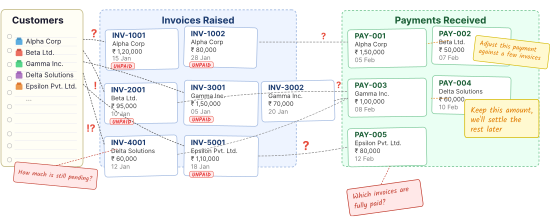
Tangled receivables — invoices, part-payments and unmatched lump-sums

So once a month, you find yourself parked next to your accountant, going down the list line by line, working out what came in, what's still pending, and how much money is owed. It eats up an entire day, and then another, and then another. And even when you're done, you're still not quite sure if the numbers are right.

You can hand off this whole process to a dashboard.

This dashboard automates the hardest part of accounts receivable reporting: making your Payments Received data match with your Invoices Raised data, and calculating outstanding balances. It gives you a clear view of:

  • All money received from customers
  • Automatic invoice settlement (FIFO method)
  • Pending and overdue invoices
  • Customer-level, company-wide collections metrics
  • Filters by customer, invoice date, payment date, time period

Instead of manually reconciling transactions, you simply refresh the model and get an up-to-date picture of your receivables.

Give it a try! Click around, this is interactive. 👇

Customers would send random payments and we'd spend hours figuring out which invoices they belonged to. Now the matching happens automatically and I can see exactly what's been paid and what's still pending.

Michael T

How does this work at the back-end?

see how the data flows

Let me first show you the architecture of the Dashboard (how the data flows in the Dashboard).
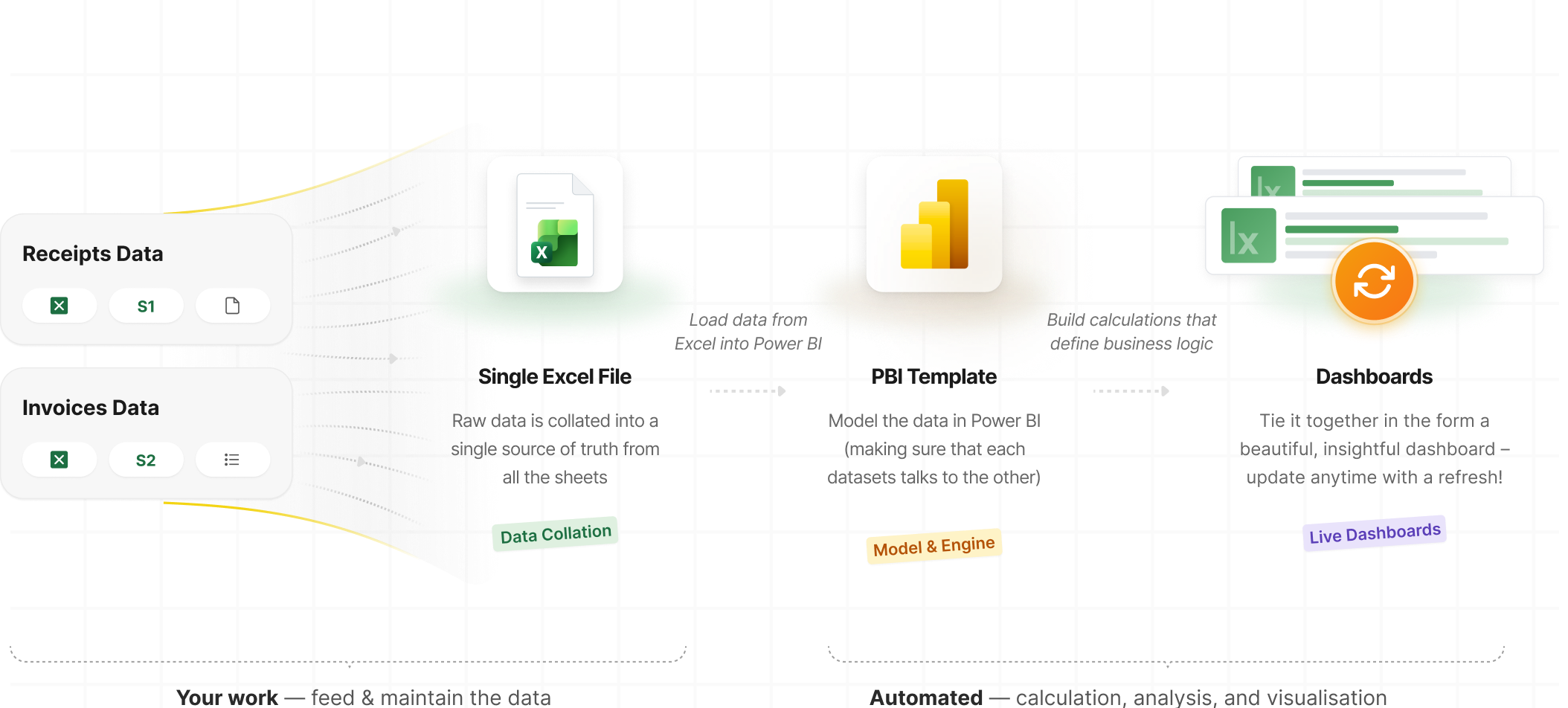
Dashboard data-flow architecture: invoices and customer payments collated into Excel, loaded into Power BI, modelled with FIFO settlement logic, and visualised as live receivables dashboards

How you’ll use this Dashboard

key features

Check the status of company’s pending receivables at a glance

See how much money has been collected, what's still outstanding, and what is overdue right at the top.

“Learning from you is soooooooo easy. Absolutely the greatest Power BI teacher on the Internet. 👍👍”

@ashu10111988
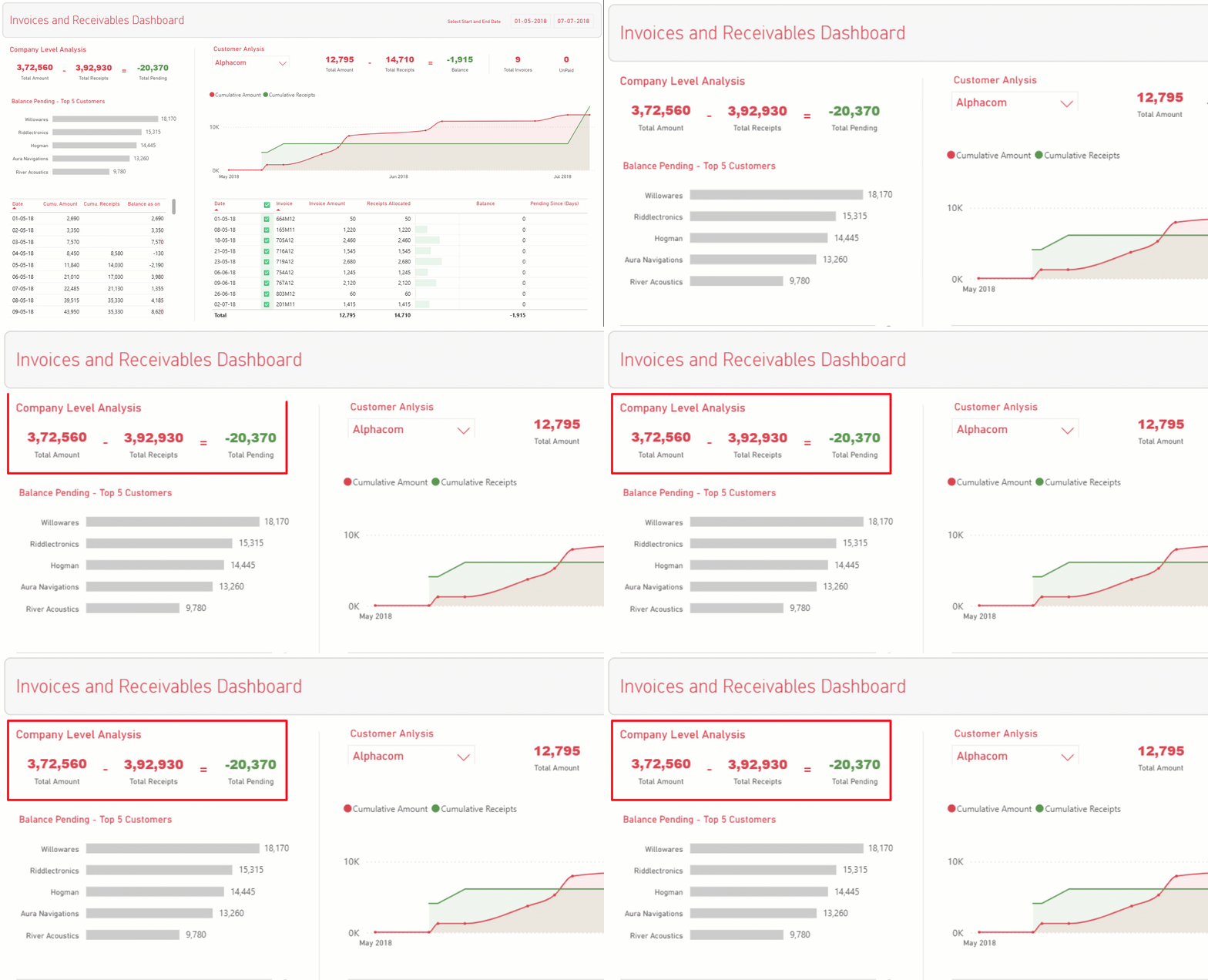
Check the status of company’s pending receivables at a glance

Take a deeper look at any particular customer, instantly

Deep-dive into any customer to view their invoices, payments, outstanding balances, and payment history.

“Chandeep's clear, to-the-point teaching made a big difference. In my office, they call me the 'magic man' who can create reports fast.”

@Venkatesh
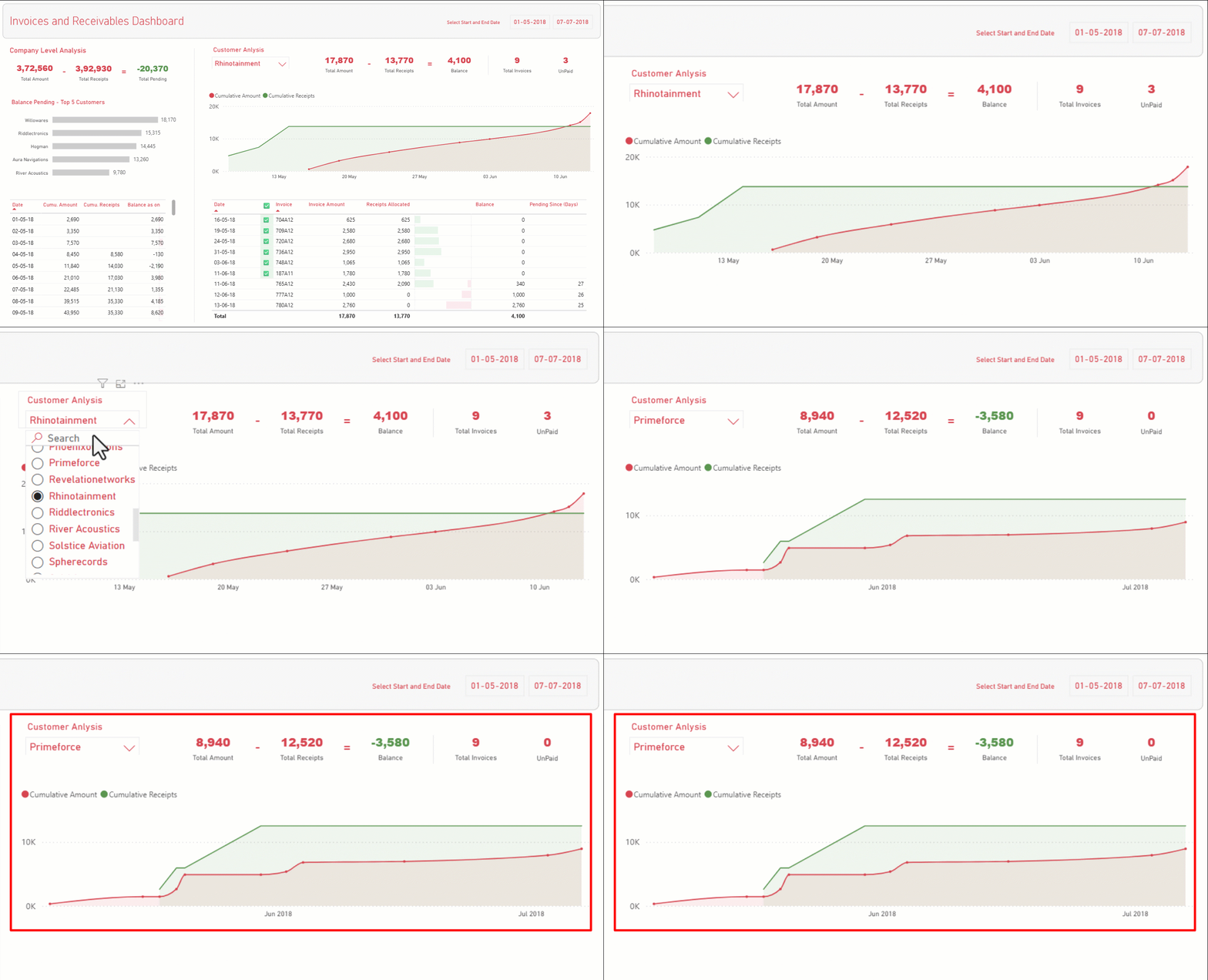
Take a deeper look at any particular customer, instantly

See number of invoices knocked off against lumpsum amounts

Track exactly which invoices were settled by each payment and how much remains unpaid.

“Comprehensive and well-structured, making complex concepts easy to understand. A special thanks to Chandeep Sir for his exceptional teaching style.”

@Jay
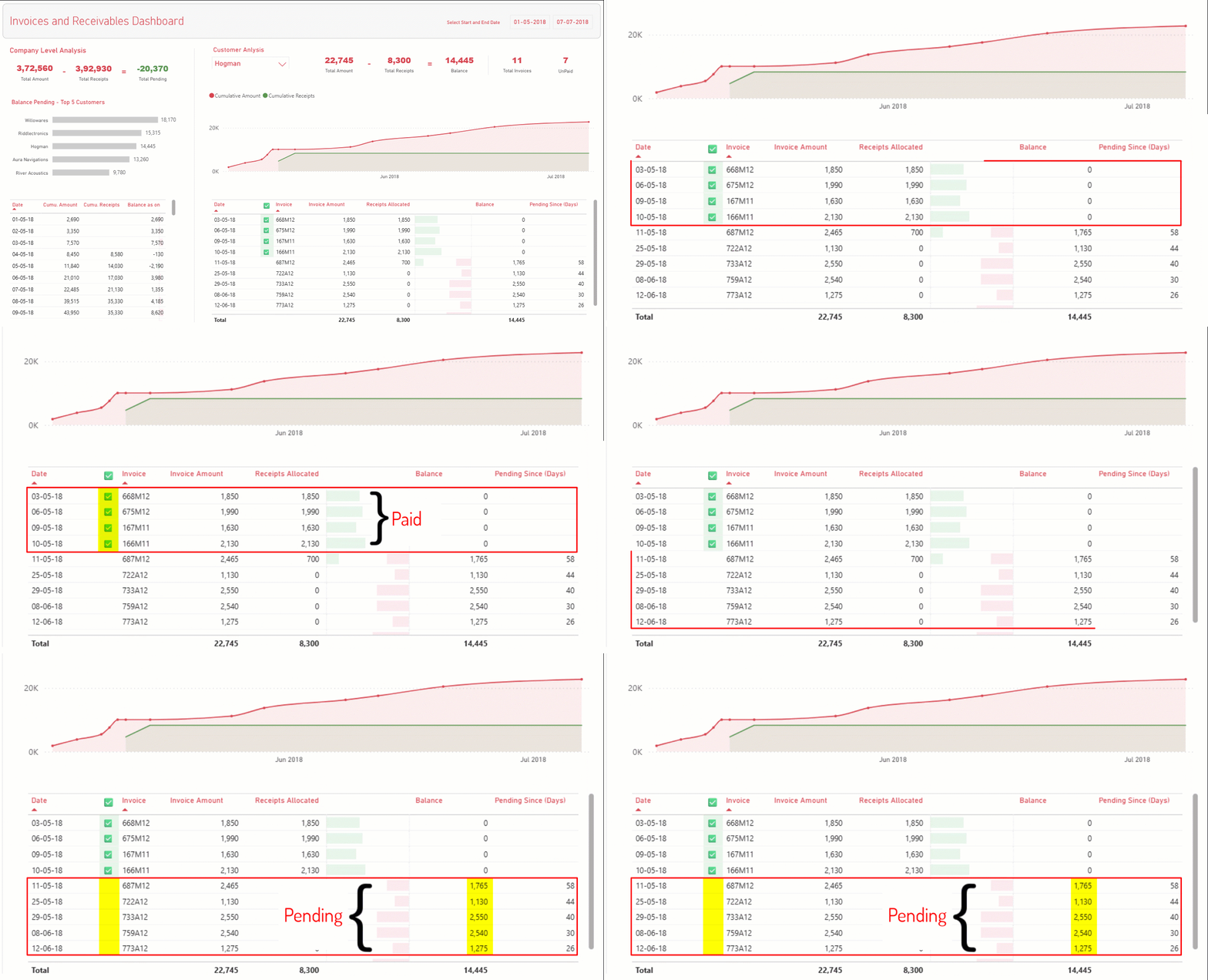
See number of invoices knocked off against lumpsum amounts

A bit more about the screen! (that you’ll like)

what we will build
A bit more about the screen! (that you’ll like)

Get a “30,000 feet” overview of the company and customer level metrics.
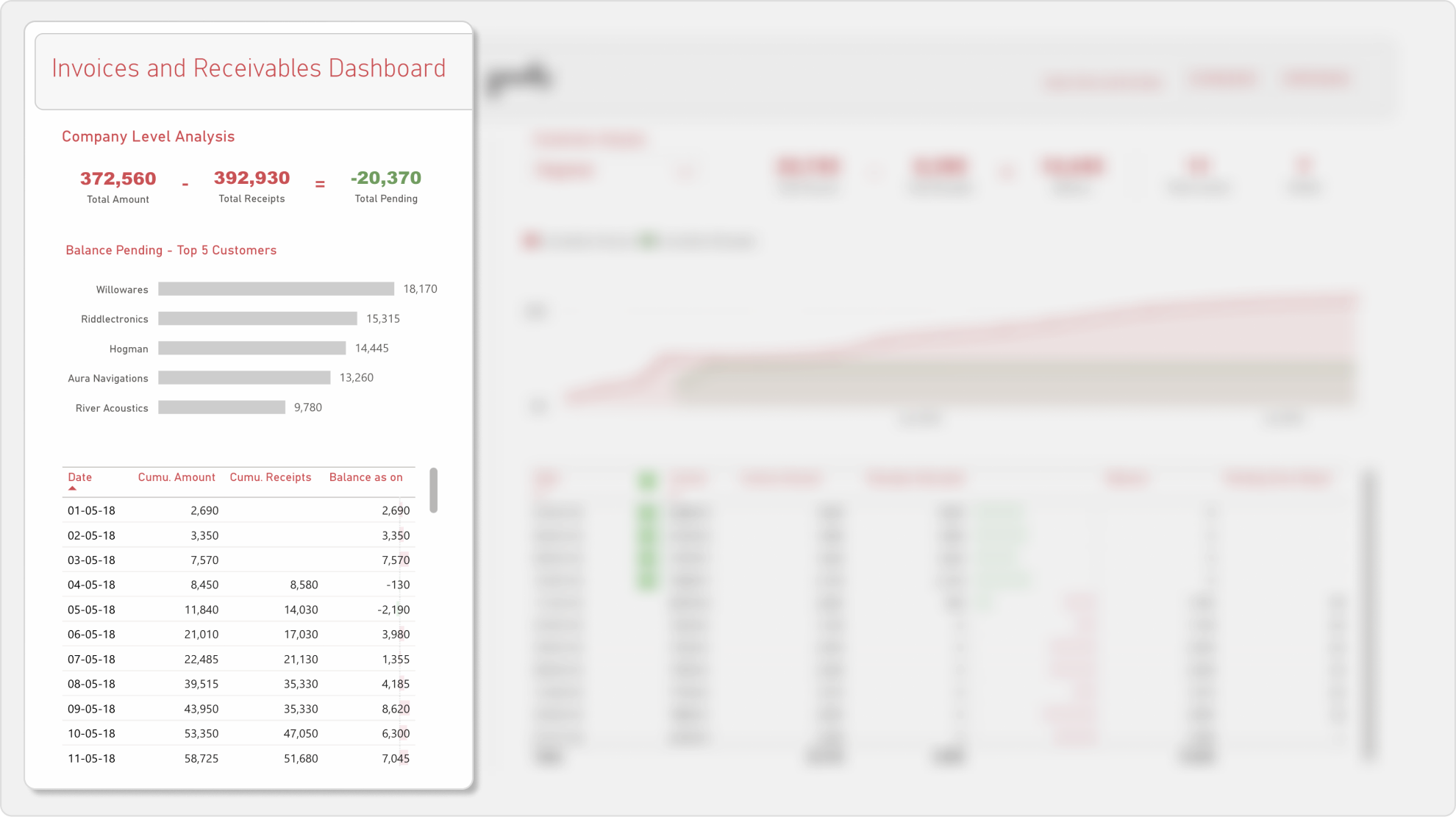
Company-level Analysis

Key Metrics

  • Total Receipts and Amount Pending till date
  • Total Billing & Balance Pending till date for selected Customer
  • Customer Level detailing

Key Features

  • Check the overall health of company billings and receivables
  • Identify customers who are lagging behind
  • Deep-dive into a specific customer to understand their payment trends

Course Outline

what we will learn
Join the Course

Prerequisites

for this course
  • You need a working knowledge of Power BI (loading data, creating measures and simple visuals etc.) and Excel.
  • You need to have MS Excel and Power BI desktop apps.
  • A windows computer to setup this Dashboard. Power BI doesn’t work on a Mac 🙁

Start building your Dashboard

Builder Pack

Complete course on building the dashboard from scratch$199
Unlocked Power BI Model (with all calculations and visuals)$199
Model Planner template$69
$467$249 + taxes

at 45% off

Not available right now
Best Value

Accelerator Pack

Complete course on building the dashboard from scratch$199
Unlocked Power BI Model (with all calculations and visuals)$199
Model Planner template$69
PLUS
30 Min 1:1 audit call for a guided implementation at your organisation$399
$866$349 + taxes

at 60% off

Not available right now

I teach the way I'd like to learn

practical & straight to the point

No Jargons, just simple English

I hate jargon, and I don’t use it in my courses. I go to great lengths to make tough concepts easy to understand.

Developing a Problem-Solving Mindset

Rather than memorizing functions and steps, I focus on teaching you how to structure and solve problems. You’ll learn to develop a problem-solving mindset so you can tackle challenges beyond the examples in this course.

Case Based Learning

All the concepts covered in this course are taught using a case study method. This approach helps you to visualize the applications of various concepts.
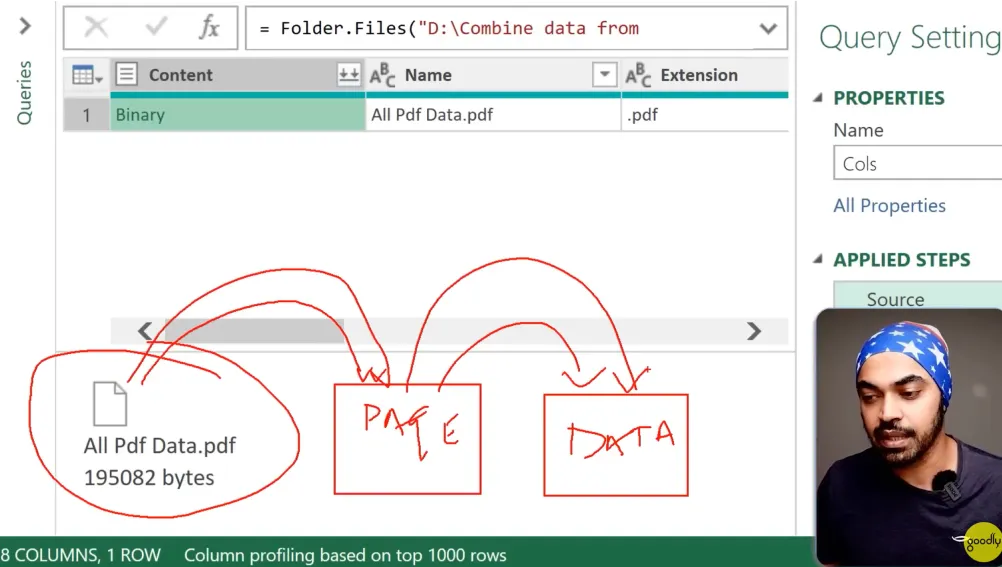
Teaching methodology preview
@ashu10111988@ashu10111988
Learning from you is soooooooo easy. Absolutely the greatest Power BI teacher on the Internet. 👍👍
@goodguywins@goodguywins
To explain such a complex topic in such simle and understandable way, bravo! Great job, thanks Chandeep for such quality content!
@mogarrett3045@mogarrett3045
Bro you're always doing great things.....keep it up!
Join the Course

Wall of Love

stories of growth

You’ll be learning alongside people from all over the world

Deepam Patel avatar
Sajeesh avatar
Aravind Kumar K avatar
Manish Lagisetty avatar
Mike avatar
Carlos Rodriguez avatar
Richard (Dick) Huitink avatar
Petra Walls avatar
Daniel Cordido avatar
Mohammad "Rajib" Chowdhury avatar
Ashlee Huff avatar
Brian Granahan avatar
Ashutosh Chaturvedi avatar
Alain Shmaryahu avatar
Jacob P. Kelly (Jake) avatar
William Mooso (Bill) avatar
Julián Molina Gaspar avatar
Eto S avatar
Rohit Trehan avatar
Hans de Doelder avatar
Karen Jones avatar
John Hackwood avatar
Harish Sugur avatar
Seelan Robert avatar
ONG TECK HO (Teck) avatar
Jonathan Hardy avatar
Manal Malek avatar
Niall Murray avatar
Eugene J avatar
Lalita Negi avatar
Mark Bradford avatar
David Fowler avatar
Riyas Ahammed avatar
Fernando Jara avatar
Arunesh Bahadur avatar
Jose Roman avatar
Lukas Tovazzi avatar
Tarek B avatar
Jozef Lovas avatar
Hiep T. Le avatar
Wyatt McNabb avatar
Peter Goldsmith avatar
Thomas Grum avatar
Luca Coscia avatar
Riccardo Blanco avatar
Paresh Patel avatar
Ramit Sehgal avatar
Ousseynou Sankharé avatar
Anjan Bose avatar
Alf Jivegård avatar
Wilnex Paul avatar
Cal Lewis avatar
Al W. Perkins avatar
Tom Eckersley avatar
Naren avatar
Rani Maheshwari avatar
Manoj Bhanudevan Pillai avatar
Vesa Benerbäck avatar
Jerry Lan avatar
Cristian Ravalli avatar
Jost Salzmann avatar
Kirtan avatar
Matthew Williams avatar
Turcan Gabriela avatar
Olaf Koberwitz avatar
Dave W. avatar
Albert T avatar
Michaël F. avatar
Marco avatar
Deepam Patel avatar
Sajeesh avatar
Aravind Kumar K avatar
Manish Lagisetty avatar
Mike avatar
Carlos Rodriguez avatar
Richard (Dick) Huitink avatar
Petra Walls avatar
Daniel Cordido avatar
Mohammad "Rajib" Chowdhury avatar
Ashlee Huff avatar
Brian Granahan avatar
Ashutosh Chaturvedi avatar
Alain Shmaryahu avatar
Jacob P. Kelly (Jake) avatar
William Mooso (Bill) avatar
Julián Molina Gaspar avatar
Eto S avatar
Rohit Trehan avatar
Hans de Doelder avatar
Karen Jones avatar
John Hackwood avatar
Harish Sugur avatar
Seelan Robert avatar
ONG TECK HO (Teck) avatar
Jonathan Hardy avatar
Manal Malek avatar
Niall Murray avatar
Eugene J avatar
Lalita Negi avatar
Mark Bradford avatar
David Fowler avatar
Riyas Ahammed avatar
Fernando Jara avatar
Arunesh Bahadur avatar
Jose Roman avatar
Lukas Tovazzi avatar
Tarek B avatar
Jozef Lovas avatar
Hiep T. Le avatar
Wyatt McNabb avatar
Peter Goldsmith avatar
Thomas Grum avatar
Luca Coscia avatar
Riccardo Blanco avatar
Paresh Patel avatar
Ramit Sehgal avatar
Ousseynou Sankharé avatar
Anjan Bose avatar
Alf Jivegård avatar
Wilnex Paul avatar
Cal Lewis avatar
Al W. Perkins avatar
Tom Eckersley avatar
Naren avatar
Rani Maheshwari avatar
Manoj Bhanudevan Pillai avatar
Vesa Benerbäck avatar
Jerry Lan avatar
Cristian Ravalli avatar
Jost Salzmann avatar
Kirtan avatar
Matthew Williams avatar
Turcan Gabriela avatar
Olaf Koberwitz avatar
Dave W. avatar
Albert T avatar
Michaël F. avatar
Marco avatar
Deepam Patel avatar
Sajeesh avatar
Aravind Kumar K avatar
Manish Lagisetty avatar
Mike avatar
Carlos Rodriguez avatar
Richard (Dick) Huitink avatar
Petra Walls avatar
Daniel Cordido avatar
Mohammad "Rajib" Chowdhury avatar
Ashlee Huff avatar
Brian Granahan avatar
Ashutosh Chaturvedi avatar
Alain Shmaryahu avatar
Jacob P. Kelly (Jake) avatar
William Mooso (Bill) avatar
Julián Molina Gaspar avatar
Eto S avatar
Rohit Trehan avatar
Hans de Doelder avatar
Karen Jones avatar
John Hackwood avatar
Harish Sugur avatar
Seelan Robert avatar
ONG TECK HO (Teck) avatar
Jonathan Hardy avatar
Manal Malek avatar
Niall Murray avatar
Eugene J avatar
Lalita Negi avatar
Mark Bradford avatar
David Fowler avatar
Riyas Ahammed avatar
Fernando Jara avatar
Arunesh Bahadur avatar
Jose Roman avatar
Lukas Tovazzi avatar
Tarek B avatar
Jozef Lovas avatar
Hiep T. Le avatar
Wyatt McNabb avatar
Peter Goldsmith avatar
Thomas Grum avatar
Luca Coscia avatar
Riccardo Blanco avatar
Paresh Patel avatar
Ramit Sehgal avatar
Ousseynou Sankharé avatar
Anjan Bose avatar
Alf Jivegård avatar
Wilnex Paul avatar
Cal Lewis avatar
Al W. Perkins avatar
Tom Eckersley avatar
Naren avatar
Rani Maheshwari avatar
Manoj Bhanudevan Pillai avatar
Vesa Benerbäck avatar
Jerry Lan avatar
Cristian Ravalli avatar
Jost Salzmann avatar
Kirtan avatar
Matthew Williams avatar
Turcan Gabriela avatar
Olaf Koberwitz avatar
Dave W. avatar
Albert T avatar
Michaël F. avatar
Marco avatar
Deepam Patel avatar
Sajeesh avatar
Aravind Kumar K avatar
Manish Lagisetty avatar
Mike avatar
Carlos Rodriguez avatar
Richard (Dick) Huitink avatar
Petra Walls avatar
Daniel Cordido avatar
Mohammad "Rajib" Chowdhury avatar
Ashlee Huff avatar
Brian Granahan avatar
Ashutosh Chaturvedi avatar
Alain Shmaryahu avatar
Jacob P. Kelly (Jake) avatar
William Mooso (Bill) avatar
Julián Molina Gaspar avatar
Eto S avatar
Rohit Trehan avatar
Hans de Doelder avatar
Karen Jones avatar
John Hackwood avatar
Harish Sugur avatar
Seelan Robert avatar
ONG TECK HO (Teck) avatar
Jonathan Hardy avatar
Manal Malek avatar
Niall Murray avatar
Eugene J avatar
Lalita Negi avatar
Mark Bradford avatar
David Fowler avatar
Riyas Ahammed avatar
Fernando Jara avatar
Arunesh Bahadur avatar
Jose Roman avatar
Lukas Tovazzi avatar
Tarek B avatar
Jozef Lovas avatar
Hiep T. Le avatar
Wyatt McNabb avatar
Peter Goldsmith avatar
Thomas Grum avatar
Luca Coscia avatar
Riccardo Blanco avatar
Paresh Patel avatar
Ramit Sehgal avatar
Ousseynou Sankharé avatar
Anjan Bose avatar
Alf Jivegård avatar
Wilnex Paul avatar
Cal Lewis avatar
Al W. Perkins avatar
Tom Eckersley avatar
Naren avatar
Rani Maheshwari avatar
Manoj Bhanudevan Pillai avatar
Vesa Benerbäck avatar
Jerry Lan avatar
Cristian Ravalli avatar
Jost Salzmann avatar
Kirtan avatar
Matthew Williams avatar
Turcan Gabriela avatar
Olaf Koberwitz avatar
Dave W. avatar
Albert T avatar
Michaël F. avatar
Marco avatar
Join the Course

Hi, I'm Chandeep!

your instructor

My superpower is taking complicated stuff and explaining it in a way that actually makes sense.

Most people know me through my YouTube channel Goodly, where over 120K subscribers follow along as I break down tricky Excel and Power BI concepts into simple, practical lessons. My channel has grown into a community of learners who appreciate clear explanations and content that actually solves real problems.

Alongside YouTube, I've been teaching through online courses for more than 10 years, with thousands of students benefiting from a style that mixes clarity with hands-on, real-world examples. I also conduct live and in-person corporate training programs for companies around the world.

Over the years, I’ve had the chance to speak at international events like the Global Excel Summit in London and Bulgaria Excel Days in Sofia. I even wrote a book on M language, which has been picked up by thousands of readers globally, something I’m still amazed by.

With 20+ years in this field, I've seen more messy data than I care to admit. These days, when I'm not teaching, I run Goodly Insights, a data analytics consulting firm providing Power BI and Excel-based solutions to companies worldwide.
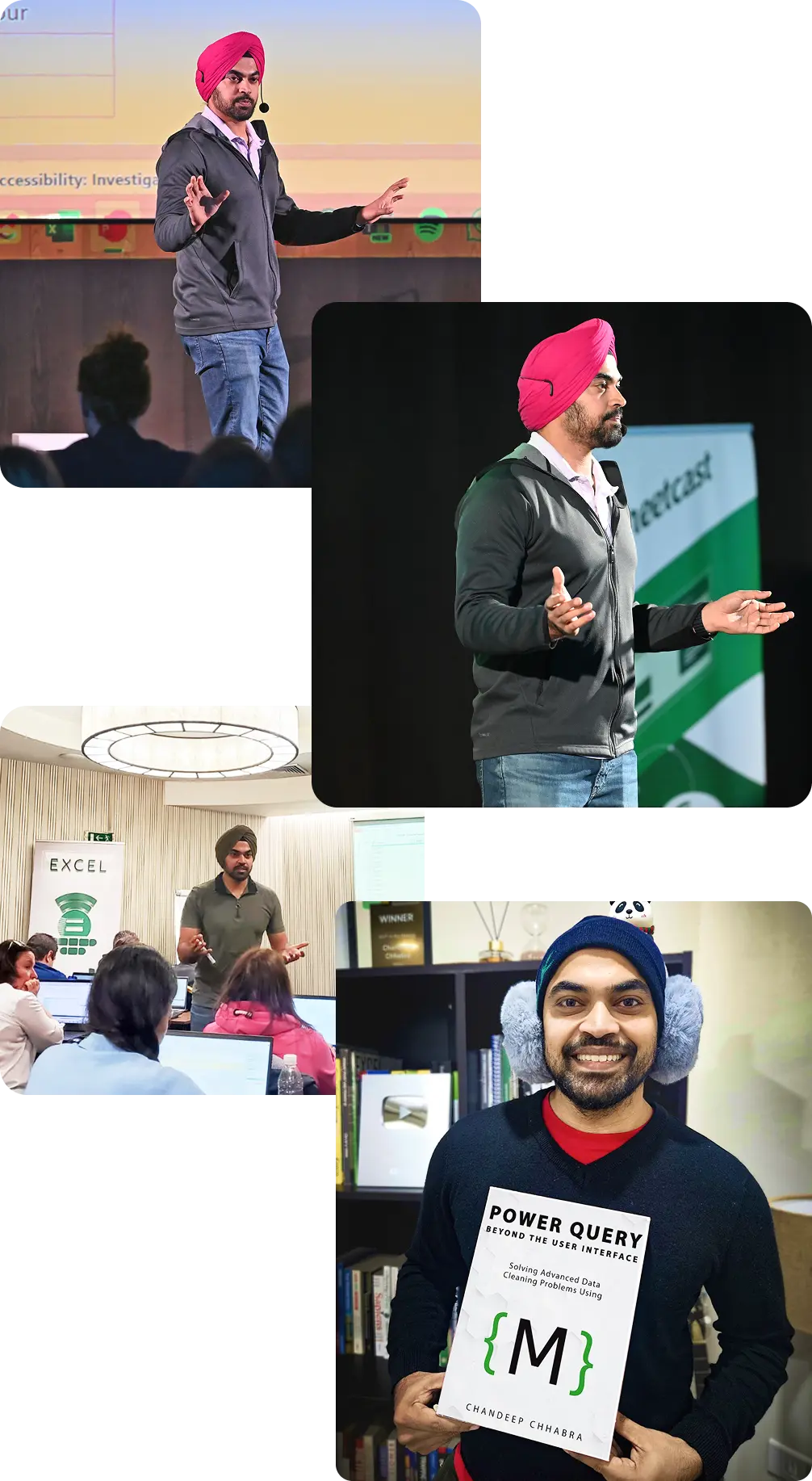
Chandeep Chhabra
danielcordido avatarDaniel Cordido
"After watching thousands and thousands of YouTube videos, I finally came across your channel,. Buddy, you're like the Leila of Power Query! Very plain English and good examples/exercises/challenges."